How to use FFmpeg to generate live thumbnail previews of a video

Not a static thumbnail matrix but a live-action thumbnail matrix

I mass-download videos from online channels. The download script does add metadata to the filename as well but I still find myself lost. The video names may not be informative enough. I needed a video preview that included not just the beginning of the video but several stops towards the end as well.
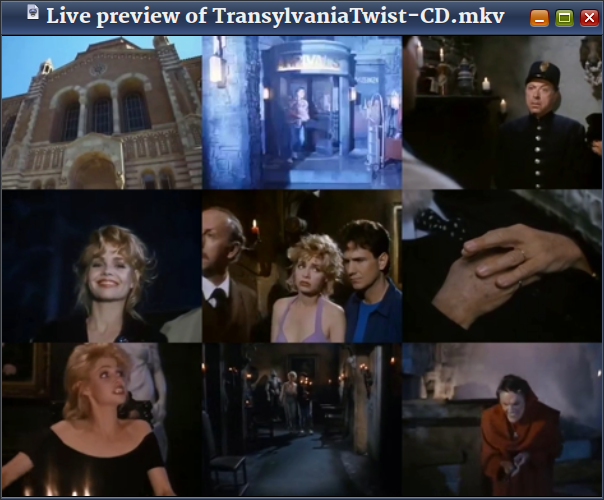
Screenshot of thumbnail video

I have provided two options in the script. One can load the matrix in memory and play it from there using ffplayffmpeg's own media player. The other will save the matrix to a temporary file and then plays it using the default media player. (The script does delete this temporary file after one minute.) If you do not have ffplay installed, then set bWriteToFile=0 and the video will play from a temporary file.

Le script is as follows:

#!/bin/bash
set -u

# Get file info
sFile="$*"
sFileDir=$(dirname "$sFile")
sFileFullName=$(basename "$sFile")
sFileName="${sFileFullName%.*}"
sExt="${sFileFullName##*.}"

# Changeables
bWriteToFile=1
#bWriteToFile=0
iLength=20
iDur=0
iWidth=0
iHeight=0
iRows=3
iCols=3
iDurLimit=$(( iRows*iCols*iLength*2 ))
#echo $iDurLimit

# Get video info
sProbeData=$(ffprobe -loglevel quiet -print_format "default=nw=1:nk=1" \
                -select_streams v:0 \
                -show_entries "stream=width,height,duration" \
                -i "${sFile}")

sDur=$(echo $sProbeData | cut -d " " -f3)
sWidth=$(echo $sProbeData | cut -d " " -f1)
sHeight=$(echo $sProbeData | cut -d " " -f2)

if [ "$sDur" = "N/A" ]; then
  sDur=$(ffprobe -loglevel quiet -print_format "default=nw=1:nk=1" \
                 -select_streams v:0 \
                 -show_entries "stream_tags=duration" \
                 -i "${sFile}")
  if [ -z "${sDur}" ]; then
    sDur1=$(ffprobe "${sFile}" 2>&1 | grep "Duration: ")
    if [ -z "${sDur1}" ]; then
            notify-send "Live Preview" "Duration stream information not found"
            echo "Live Preview: Duration stream information not found"
            exit
    else
          sDur2=${sDur1%%,*}
          sDur=${sDur2:11}
    fi
  fi

  sDur=${sDur%.*}
  iMin=$(echo $sDur | cut -d ":" -f2)
  iHour=$(echo $sDur | cut -d ":" -f1)
  iSec=$(echo $sDur | cut -d ":" -f3)
  iHour=${iHour#0}
  iMin=${iMin#0}
  iSec=${iSec#0}
  let iHour=iHour*60*60
  let iMin=iMin*60
  #echo $iHour $iMin $iSec
  let iDur=iHour+iMin+iSec
  #echo $iDur $iHour $iMin $iSec
else
  iDur=${sDur%.*}
fi

if [[ $sWidth =~ [^0-9] ]] || [[ $sHeight =~ [^0-9] ]]  || \
   [[ $sHeight =~ [^0-9] ]]; then
  notify-send "Live Gallery" "Invalid video info found"
    echo "Live Preview: Invalid video info found"
    exit
else
  let iWidth=sWidth
  let iHeight=sHeight
fi

#echo "Duration is $iDur"
#echo "Resolution is ${iWidth}x${iHeight}"

if [ $iDur -lt $iDurLimit ]; then
  notify-send "Live Gallery" "Not worth it"
    echo "Live Preview: Not worth it"
    exit
fi

# Build ffmpeg filter string
let iSplits=iRows*iCols
#echo $iSplits

if [ $bWriteToFile -eq 1 ]; then
  sFilter="movie=filename=${sFile},split=${iSplits}"
else
  sFilter="[0:v:0]split=${iSplits}"
fi

i=0
while [ $i -lt $iSplits ]; do
  sFilter="${sFilter}[v${i}]"
  let i=i+1
done

if [ $bWriteToFile -eq 1 ]; then
  sFilter="${sFilter};amovie=filename=${sFile},asplit=${iSplits}"
else
  sFilter="[0:a:0]asplit=${iSplits}"
fi

i=0
while [ $i -lt $iSplits ]; do
  sFilter="${sFilter}[a${i}]"
  let i=i+1
done

let iBreaks=$(( 1 + (iRows*iCols) ))
let iInterval=iDur/iBreaks
let iStart=iInterval
let iLast=iDur-iInterval
i=0
while [ $iStart -le $iLast ]; do
  sFilter="${sFilter};[v${i}]trim=start=${iStart}:duration=${iLength},setpts=PTS-STARTPTS,scale=${iWidth}/${iCols}:${iHeight}/${iRows}:force_original_aspect_ratio=decrease:force_divisible_by=2[sv${i}];[a${i}]atrim=start=${iStart}:duration=${iLength},asetpts=PTS-STARTPTS[sa${i}]"
  let iStart=iStart+iInterval
  let i=i+1
done
sFilter="${sFilter};"

let i=0
while [ $i -lt $iRows ]; do
  let j=0
  while [ $j -lt $iCols ]; do
    let k=(i*iCols)+j
    sFilter="${sFilter}[sv${k}]"
    let j=j+1
  done
  sFilter="${sFilter}hstack=inputs=${iCols}[r${i}];"
  let i=i+1
done

i=0
while [ $i -lt $iRows ]; do
  sFilter="${sFilter}[r${i}]"
  let i=i+1
done

sFilter="${sFilter}vstack=inputs=${iRows},pad=${iWidth}:${iHeight}:(ow-iw)/2:(oh-ih)/2:black[out0];"

i=0
while [ $i -lt $iSplits ]; do
  sFilter="${sFilter}[sa${i}]"
  let i=i+1
done
sFilter="${sFilter}amix=inputs=${iSplits}[out1]"

# Run it
if [ $bWriteToFile -eq 1 ]; then
  ffplay -autoexit \
         -window_title "Live preview of ${sFileName}.${sExt}" \
         -f lavfi -i "${sFilter}"
else
  sTempDir=$(dirname $(mktemp -u))
  ffmpeg -i "$sFile" \
         -filter_complex "${sFilter}" \
         -map "[out0]" -map "[out1]" \
         -c:v libx265 -preset ultrafast -c:a flac -ac 2 -y \
         "${sTempDir}/${sFileName}-PREVIEW.mkv" && \
      xdg-open "${sTempDir}/${sFileName}-PREVIEW.mkv" && \
      sleep 60 && \
      rm "${sTempDir}/${sFileName}-PREVIEW.mkv"
  #Replace 'libx265 -preset ultrafast' with 'ffv1' if your 
  #media player can play it
fi

I use this script in a Caja Action Configuration.
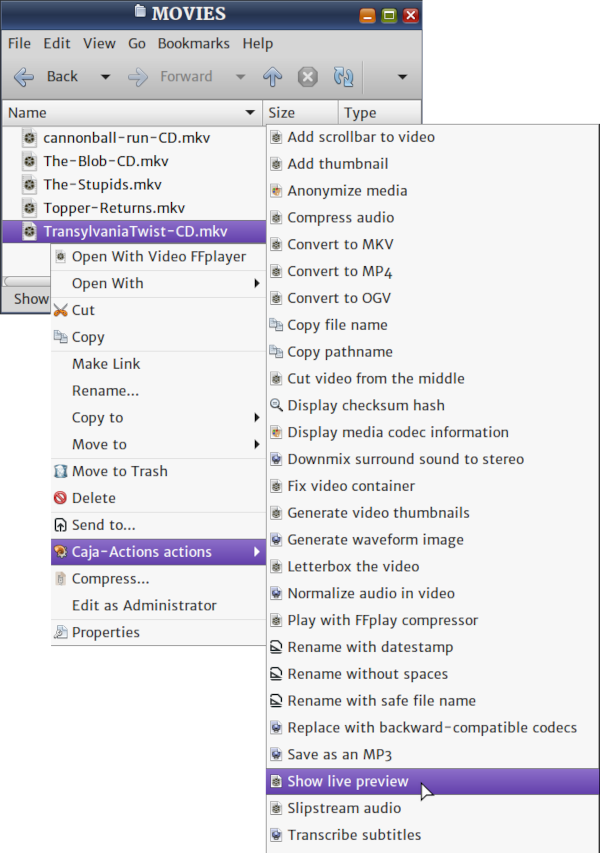
Caja Actions Configuration screenshot

The script is scalable. On any computer, particularly if you want to listen to the downmixed audio as well, a 2x2 matrix should be optimal. On my computer, anything more than 3x3 causes it to run out of memory. If it was a static thumbnail matrix, the script would have executed a few seconds. But, this script generates video thumbnails and it takes more than just a few seconds. Still, it is a time saver.
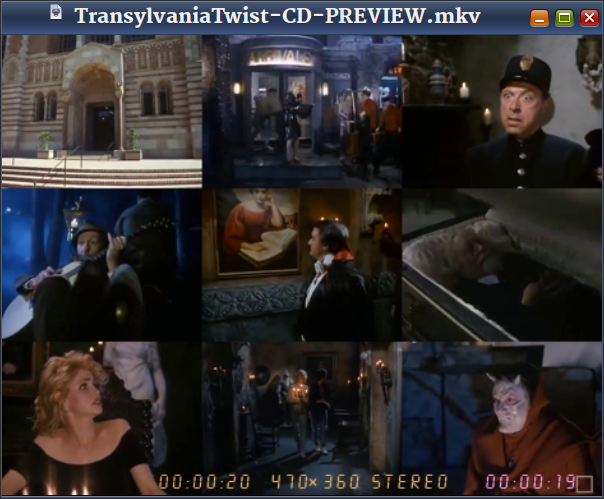
Screenshot of thumbnail video

Video Demo

Rumble


Become an FFmpeg PRO by reading my book Quick Start Guide to FFmpeg.

Book photo

Link: | Magic Link:

Comments are not enabled yet.

How to save a burned-out LED bulb

Jugaad to the rescue

Unlike incandescent bulbs, LED light bulbs can be repaired. Not all the time … sometimes. All you need to do is use a multimeter in continuity testing mode and check the terminals of each surface-mounted LED chip. If an LED lights up, it is okay. If it is not, you pour some molten lead around the affected chip, in effect shorting its positive and negative terminals. This will let the current pass through the circuit and make the bulb usable.

The ‘bulb’ portion of the LED light is made of plastic. It will come off the base if you jigger it carefully. (In Desi English, you ‘man-handle’ it.)

Sometimes though, the bulb is beyond repair. Rather throw away the whole bulb, I decided to replace its guts with a regular two-prong LED and a resistor. This resistor will need to have a high resistance as the circuit will be on AC, not DC.

Some Sikh guy with a video channel … probably Mr. Sewak mentioned in some ancient video that an LED bulb can be lit up by AC if you limit the current with a 100k resister. I think this resistor is 200K. (Do not go below 100K or you will cause a fire.) Anyway, here is my implementation … jugaad, if you please.

Jugaad electronics

Link: | Magic Link:

Comments are not enabled yet.

How to censor videos using FFmpeg — masking

Learn to blacken a portion of screen

Back when The Onion was a satire website, it published an article titled CIA Realizes It’s Been Using Black Highlighters All These Years to mock the cocaine import agency's propensity for redacting almost all the documents it declassified. I will show you something similar. FFmpeg has a filter that can draw a box on a video and fill it with colour if necessary. The colour can be specified in RGBA format or using one of the HTML colour names. The filter is aptly named drawbox and here is the output of the documentation command ffmpeg -h filter=drawbox.

Filter drawbox
  Draw a colored box on the input video.
    Inputs:
       #0: default (video)
    Outputs:
       #0: default (video)
drawbox AVOptions:
   x                 <string>     ..FV.....T. set horizontal position of the left box edge (default "0")
   y                 <string>     ..FV.....T. set vertical position of the top box edge (default "0")
   width             <string>     ..FV.....T. set width of the box (default "0")
   w                 <string>     ..FV.....T. set width of the box (default "0")
   height            <string>     ..FV.....T. set height of the box (default "0")
   h                 <string>     ..FV.....T. set height of the box (default "0")
   color             <string>     ..FV.....T. set color of the box (default "black")
   c                 <string>     ..FV.....T. set color of the box (default "black")
   thickness         <string>     ..FV.....T. set the box thickness (default "3")
   t                 <string>     ..FV.....T. set the box thickness (default "3")
   replace           <boolean>    ..FV.....T. replace color & alpha (default false)
   box_source        <string>     ..FV.....T. use data from bounding box in side data

What is not mentioned above but is available in the full HTML documentation is that the thickness option can be set to the value fill and the filter will not just draw the outline but also fill it with black or the colour specified by the color option.

Background

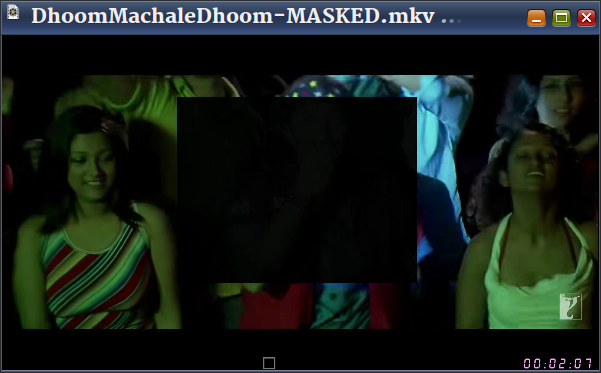
When I bought my latest TV, I had no choice but to choose the dreaded SMART TV option. There were no dumb TVs at that size. However, I made sure that it did not use Google Android spyware or an Android-based OS such as the AOSP. On my old TV, I used a media box (WD TV) for streaming over the Internets. On this new TV, wired (Ethernet) networking was built-in. I do not leave the TV connected to the Internet but I did test its media streaming abilities for a while. [I continue to download and play online videos offline because someone seems to throttle bandwidth intermittently.] One app played the Hindi movie song Dhoom Machale Dhoom. The fireworks in the beginning of the song intrigued me … they seemed too real. Outside the app, I had downloaded the song and I could not get the same effect. Anyway, the video file is in my collection of cool Hindi movie songs that I like to watch once in a while. But, there was something very very annoying in this song. It is a guy in the audience whom the director had forced to overact. This guy's sequences irritated me so much I had long felt the need to censor him off the video. Recently, I wrote a script to perform such censorships. Here is the effect.

Screenshot of FFplay video player

For each black box sequence, the script prompts for

  • starting time (in seconds)
  • ending time (in seconds)
  • coordinates of the top-left corner of the box in x:y format
  • width and height of the box in w:h format

To obtain the values, I had to pause the video, take a screenshot and paste from clipboard in GIMP. I would then use the Rectangle Select Tool to mark the region that needs to be masked and this gave me the x:Y and w:h values. I recorded these values in a text file (doomed.txt) …

Screenshot of text editor

… and then input it to the script.

bash mask-video.txt DhoomMachaleDhoom.mkv < doomed.txt

Video Masking FFmpeg Script

#!/bin/bash

set -u

sFile=$(readlink -f "$*")
sFileDir=$(dirname "$sFile")
sFileFullName=$(basename "$sFile")
sFileName="${sFileFullName%.*}"
sFileExt="${sFileFullName##*.}"

if [ -f "$sFile" ]; then
   echo "Masking $sFile"
else
  echo -f "ERROR: Not found $sFile"
  exit
fi

i=0
sFilter=""
echo "Press Enter twice to exit data-entry loop."
while true; do

    read -p "Enter starting time: " iStart
    read -p "Enter ending time: " iEnd

    if [ -z $iStart ] || [ -z $iEnd ]; then
        break
    fi

    if [ $iStart -ge 0 ] 2> /dev/null   && 
         [ $iEnd -ge 0 ] 2> /dev/null ; then
        if [ $iStart -ge $iEnd ]; then
            echo "ERROR: Starting time cannot be >= to ending time."
            echo "--------------------"
            continue
        else
          read -p "Enter mask location (x:y) values: " sMaskCoordinates
          read -p "Enter mask dimension (w:h) values: " sMaskDimensions

      if [ -z "$sMaskCoordinates" ] || [ -z "$sMaskDimensions" ]; then
        echo -e "ERROR: Invalid mask value(s)\n--------------------"
            continue
      else
        let i=i+1
        if [ -z "$sFilter" ]; then
          sFilter="[0:v:0]drawbox=${sMaskCoordinates}:${sMaskDimensions}:color=0x000000F0:thickness=fill:enable='between(t,${iStart},${iEnd})'"
        else
          sFilter="${sFilter},drawbox=${sMaskCoordinates}:${sMaskDimensions}:color=0x000000F0:thickness=fill:enable='between(t,${iStart},${iEnd})'"
        fi
      fi
        fi
    else
        echo -e "ERROR: Invalid number(s)\n--------------------"
        continue
    fi
done

cd "$sFileDir"
if [ -n "$sFilter" ]; then
  ffmpeg -i "$sFile" \
         -filter_complex "$sFilter" \
         -map 0:a \
         -c:V:0 libx265 -crf 28  \
         -c:a copy \
         -r 25 -pix_fmt yuv420p -y \
         "${sFileDir}/${sFileName}-MASKED.${sFileExt}" && \
     xdg-open "${sFileDir}/${sFileName}-MASKED.${sFileExt}"
fi

The masking black box is not entirely black. I have used a transparency value (F0 in 0x000000F0)

Video demo

Here is the low-res masked video sans audio in consideration of their copyright and my fair use.

Rumble

Next stop: Remove John Abraham from the Dilbar song because he seems to be searching for a bathroom.

Alternatives

There are many ways to censor videos. I use one of three techniques:

  1. Masking: Block a part of the video frame, as described above
  2. Replace a colour with another: In an older blog post, I have mentioned how to censor skin tones to censor gratuitous airing of the cleavage.
  3. Blank the whole video frame and/or silence the audio: I will describe this in an another blog post.

Become an FFmpeg PRO by reading my book Quick Start Guide to FFmpeg.

Book photo

Link: | Magic Link:

Comments are not enabled yet.

For older posts, check the archives.