
How to use RSS
for privacy and profit
Learn about RSS feeds, RSS clients, online censorship, monetization opportunities, privacy benefits, podcasts, …
Social Media may tempt website owners by bringing in a swarm of visitors once in a while but that is essentially a bait-and-switch trap. Ultimately, the Social Media companies will want to be paid. There are other less onerous ways to grow the audience for a website. Email is one of them but not everyone wants to consume news, opinion or entertainment through email. How about RSS? It is a time-tested strategy to build a loyal audience without exposing them to the intrusive tracking done by tech giants.
If you have nothing to hide, then you do not have to worry about tech companies tracking your activities, right? You will change your mind if you had received the kind of email that a Florida man received from Google's law-enforcement-liaison department. In March 2020, NBC News reported that the police was seeking blanket access to all the data Google had on him. Probable cause? He had unwittingly used an exercise-tracking app on a Google device when he went on a bicycle around a home that was (unknown to him) being burglarized.
This kind of aggravation could have been avoided simply by not being so dependent on smartphones and other supposedly smart devices. If thousands of people say they get locked out of their 'smart homes' when Amazon faces an outage, who can you really blame? Stop using apps for activities that can be easily done without them.
Even if you do not leave the mobile data or the wireless connection of your phone on all the time, there will be continuous tracking. Smartphones are designed to continue to report your movements even in airplane mode or even when the phone is turned off. You agree to this incessant tracking when you mindlessly click the ‘Next’ button when you first set up the phone. The only way to avoid this tracking is to use a feature/button phone or no phone at all. Unfortunately, this is not an easy option for everyone.
When you are using a desktop or a laptop, do not be logged into Google. Then, how will you check your email? Do not check your mail in the browser. There is a dedicated software for it. It is called an email client. Use Thunderbird or Seamonkey to separate your email from your browsing.
Similarly, do not log into Facebook or Twitter to read your news. It gives them the ability to censor news and track you. Go directly to the source, anonymously. But there are potentially dozens or hundreds of news sources. Who has the time to visit all of them? There is a simple solution — RSS.
An RSS feed
RSS stands for Really Simple Syndication. It was created by Aaron Swartz, who was also the creator of MarkDown, Creative Commons and Reddit.
RSS is an XML-based technology for notifying consumers of fresh content that is published online. An RSS file published by a website is known as an RSS feed or a news feed or a web feed. Like a web page, an RSS feed will be accessible from a World Wide Web address.
http://www.vsubhash.in/rss.xml
http://rss.cnn.com/rss/edition.rss
A website can have multiple news feeds.
http://www.vsubhash.in/blogs/blog/rss.xml
http://www.vsubhash.in/blogs/tweets/rss.xml
Some websites provide topic-specific RSS feeds.
https://news.google.com/rss/search?q=ukraine
https://stackoverflow.com/feeds/tag?tagnames=java
A website may provide reader comments in a thread-specific RSS feed.
https://www.opensourceforu.com/2016/05/how-to-run-android-without-google/feed/
https://stackoverflow.com/feeds/question/77349789
Realtime data can be published as RSS feeds.
https://rssfeed.azure.status.microsoft/en-us/status/feed/
https://w1.weather.gov/xml/current_obs/PAMR.rss
RSS clients
End-users who wish to read or be notified of the fresh content using these RSS links will have to use RSS client applications. RSS clients are variously known as RSS readers, news readers or feed readers. RSS readers are available as desktop and mobile applications. Browsers and email clients may natively support RSS feed or with add-ons. I have an RSS reader built into a namesake Web browser app for Android. It is focussed on usability and privacy.


There are many other RSS apps, not just this one. My app anonymously stores all downloaded data offline — on your device. Other apps may not. Read the feature description before installing one. There are also some online RSS reader services, which defeat the idea of using RSS for anonymity.
When you encounter a site that you like, find out its RSS link. It is usually behind an orange icon. Some news websites may have a dedicated page where they list all their RSS links.
An undeclared war on RSS?
Facebook and Twitter used to have RSS feeds when they were growing their audience. To monetize their apps, they removed RSS support and became walled gardens. There was also an undeclared war on RSS. Web browsers used to indicate the availability of an RSS feed in the address bar but they quietly removed the feature. If Google, Facebook and Twitter can become the gateways of online content, it becomes easier to censor news, opinion and information.
Does Youtube have RSS feeds?
Strangely, Youtube video channels continue to support RSS. They do not display the links anywhere. You have to manually construct it in this format:
https://www.youtube.com/feeds/videos.xml?channel_id=______The blank part must be replaced with the internal channel ID of whichever video that you are watching. Now that Youtube has assigned Twitter-like usernames to channels, the channel IDs are not easy to copy. However, you can open the web console (Tools » Web Developer Tools » Console) and type ytInitialPlayerResponse.videoDetails.channelId, you will get the channel ID in quotation marks. For the Electronics For You video channel, I got the ID as "UCJbnMYV_yigckub3RjtXD1Q". With this ID, the channel RSS link can be constructed as:
https://www.youtube.com/feeds/videos.xml?channel_id=UCJbnMYV_yigckub3RjtXD1QTo automate this task for other channels, create a bookmarklet in your browser with this code.
window.alert("https://www.youtube.com/feeds/videos.xml?channel_id=" + ytInitialPlayerResponse.videoDetails.channelId);What is a bookmarklet? It is a bookmark that uses Javascript code instead of an ordinary WWW address. The code has to be specially formatted for use in a bookmark. There are lot of bookmarklet formatter website services that you can use for this purpose.
Use RSS for profit
A major problem with many web design and marketing professionals is that they know all about Social Media and nothing about RSS. When they are asked to improve the reach of an existing website, the first thing they do is remove support for RSS feeds. Their reasoning is that RSS readers allows people to stay inside their RSS readers and never visit the site publishing the content. This is a misconception. A website needs to publish only the article headlines in their RSS feed. It does not have to publish the entire article content in the feed. If a person is interested in reading an artice, he will click the link and visit the site.
Paradoxically, the same web marketing individuals will add Social Media plugins to every page in the website. Will that not cause the reader to leave the website? Apparently, that is okay. Don't you want your content to become viral, they ask. The unfortunate truth is 99.99% of your visitors will blindly ignore these sharing links. The rest will not make much of a difference. All that these social media plugins (Javascript) do is slow down your website pages. They also help these sites add your site to the list of sites where they can continue to monitor and track your visitors. If at all some article does become viral (chances comparable to double lightning strikes) because of these plugins, the fickle traffic rush will leave as soon as it arrived. Another important thing that web marketers ignore or will not tell you is that not every Social Media mention is seen by all followers. To limit information overload and to monetize traffic leaving to external sites, Social Media companies deliberately limit the visibility of users' posts. In other words, subtle censorship. To gain visibility, they want you to advertise. In other words, subtle extortion. The sites that advertise get more visibility. You have to pay money to one guy to bring in traffic and then make money from another who displays ads. The gamble may not pay off.
In contrast, the anonymous RSS costs almost nothing extra. Growth of this organic traffic may be linear and slow. Over time however, the publisher can reap the benefits of an ever-growing audience that no middleman can censor. Publishers must foster this kind of loyal traffic that is dependable. The Social Media traffic can dry up suddenly one day when they inexplicably change their algorithm (as they have done many times in the past) or if payments cannot be made.
Instead of diverting traffic to Social Media sites, publishers should ask visitors to subscribe to their RSS feeds. When a feed indicates that there is valuable content on a site, the subscribers will click and visit the site. When they visit the site, the publisher can then monetize the traffic by
- serving unobtrusive ads to the visitors, that is, no annoying overlays or popups
- provide easy links to subscribe to
- an ad-free paywall
- a print edition
RSS is not the only game in town. Online publishers can use other mediums to monetise their content. Email newsletters is one of them. Some people prefer email newsletters as their email clients enables them to perform offline searches of news articles. The same headline, link, snippet and intro image strategy used in RSS feeds can be used in email newsletters too. However, email is subject to filters and deliverability issues. You need to proceed with great care as irresponsible use of email newsletters can result in blacklisting of your domain. You can read more about this subject in my free ebook Email Newsletter Strategies For Profit.
Anatomy of an RSS feed
An RSS feed is so simple that it can be hand-coded. Most website content management systems (CMS) and blogging software automatically generate RSS feeds.
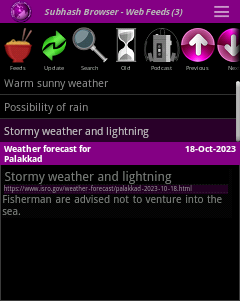
The initial part of the XML is metadata about the feed. In this metadata, the RSS feed identifies itself and also provides a link back to itself. What follows next are individual news items or article metadata wrapped inside item tags. Each item tag includes a title (or headline) and a link for the news item, status update, article or blog post. A guid tag is required to provide a globally unique ID to make it easy for an RSS reader to uniquely identify the item in its database. It is common practice to use the URL of the news item as a GUID if it happens to be unique.
<?xml version="1.0"?>
<rss version="2.0">
  <channel>
    <title>Weather forecast for Palakkad</title>
    <description>Daily weather forecast provided by ISRO</description>
    <link>https://www.isro.gov/weather-forecast/palakkad.xml</link>

    <item>
      <title>Warm sunny weather</title>
      <description>Clear sky.</description>
      <link>https://www.isro.gov/weather-forecast/palakkad-2023-10-20.html</link>
      <guid>https://www.isro.gov/weather-forecast/palakkad-2023-10-20.html</guid>
      <pubDate>Sun, 20 Oct 2023 00:00:00 +0530</pubDate>
    </item>

    <item>
      <title>Possibility of rain</title>
      <description>It may or may not rain.</description>
      <link>https://www.isro.gov/weather-forecast/palakkad-2023-10-19.html</link>
      <guid>https://www.isro.gov/weather-forecast/palakkad-2023-10-19.html</guid>
      <pubDate>Sat, 19 Oct 2023 00:00:00 +0530</pubDate>
    </item>

    <item>
      <title>Stormy weather and lightning</title>
      <description>Fisherman are advised not to venture into the sea.</description>
      <link>https://www.isro.gov/weather-forecast/palakkad-2023-10-18.html</link>
      <guid>https://www.isro.gov/weather-forecast/palakkad-2023-10-18.html</guid>
      <pubDate>Fri, 18 Oct 2023 00:00:00 +0530</pubDate>
    </item>
</channel>
</rss>
You can place rich-text content including images inside the description tags using in HTML (with CDATA formatting for XML). In this respect, RSS feeds are better than email newsletters. Email clients will usually block images. RSS clients display images in all their glory. Just add a good intro image and an interesting text snippet to each news item, and there will be no stopping the traffic.
Podcasts
Podcasts are also published as RSS feeds. They have an extra enclosure tag providing the location of the MP3 file.
<enclosure url="https://www.allindiaradio.gov.in/news-in-english/2023-10-20-nie-en.mp3" length="2324324324" type="audio/mpeg" />RSS readers and podcast apps consume the RSS feeds and enable you to download and play the MP3 file.
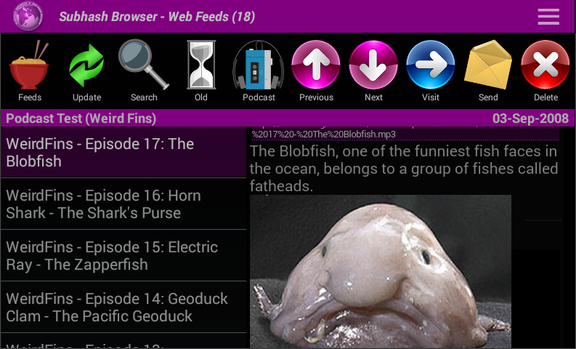
A lot of people have no time to read articles. Instead, they listen to audiobooks and podcasts when they are commuting. A news organization can convert a select few of its news articles as podcasts and deliver them to these subscribers using the same RSS feeds. Podcasts can also be monetized by adding advertisements or other promotional material.