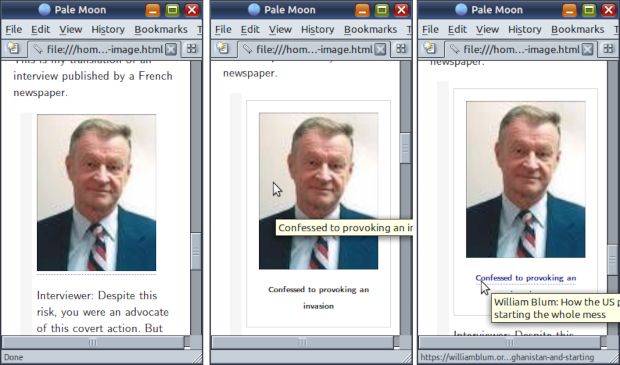
When you create a image in CommonMark or MarkDown …
… an IMG (image) tag is created inside a P (para) tag. The browser will display the alt attribute when the image is being downloaded or if it is unable download the image.
<p><img src="photo-zbigniew-brzezinski.jpg" alt="Photo of Zbigniew Brzezinski" /></p>
This was good for the early days for the weby. HTML5 has a newer FIGURE tag. It encapsulates an IMG and a new FIGCAPTION tag. Using CSS, the FIGURE tag can be styled like a box. The image description below the image can be styled like a paragraph bounded by the box. Unfortunately CommonMark does not generate FIGURE tags. It continues to wrap IMG tags inside a P tag. However, if you can use Javascript, there is an easy workaround.
Just add the title attribute. Javascript can be used to repurpose it as the text content of the FIGCAPTION tag.
This creates an IMG tag with a title attribute. The attribute will be displayed if you hover the mouse pointer over the image.
<p><img src="photo-zbigniew-brzezinski.jpg" alt="Photo of Zbigniew Brzezinski" title="Confessed to provoking an invasion" /></p>
The alt and title attributes are used by accessibility applications and are not ordinarily displayed by the browser. You need to hover the mouse over the image or check the image information window.
Sometimes images are encapsulated in a link.
[](https://williamblum.org/essays/read/how-the-us-provoked-the-soviet-union-into-invading-afghanistan-and-starting "William Blum: How the US provoked the Soviet Union into invading Afghanistan and starting the whole mess")This results in a A tag around the IMG tag.
<p><a href="https://williamblum.org/essays/read/how-the-us-provoked-the-soviet-union-into-invading-afghanistan-and-starting" title="William Blum: How the US provoked the Soviet Union into invading Afghanistan and starting the whole mess"><img src="./photo-zbigniew-brzezinski.jpg" alt="Photo of Zbigniew Brzezinski" title="Confessed to provoking an invasion" /></a></p>
Now, for the Javascript you need to add.
<script>
function addImageCaptions() {
  var arCaptionedImages = document.querySelectorAll("img[title]");
  console.log(arCaptionedImages.length);

  for (var i = 0; i < arCaptionedImages.length; i++) {
    var oFigure = document.createElement("figure");
    oFigure.style.width = (arCaptionedImages[i].clientWidth)+"px";
    if (arCaptionedImages[i].parentElement.tagName.toLowerCase() == "a") {
      var sTitle = "";
      if (arCaptionedImages[i].parentElement.hasAttribute("title")) {
        sTitle = " title=\"" + arCaptionedImages[i].parentElement.getAttribute("title") + "\" ";
      }
      oFigure.innerHTML =
          arCaptionedImages[i].outerHTML +
          "\n<figcaption><a href=\"" + arCaptionedImages[i].parentElement.getAttribute("href") + "\"" +
          sTitle + " target=\"_blank\">" + arCaptionedImages[i].title + "</a></figcaption>";
    } else {
      oFigure.innerHTML = arCaptionedImages[i].outerHTML + "\n<figcaption>" + arCaptionedImages[i].title + "</figcaption>";
    }
    arCaptionedImages[i].parentElement.insertAdjacentElement('afterend', oFigure);
    arCaptionedImages[i].parentNode.removeChild(arCaptionedImages[i]);

  }
}

function loadHandler() {
  try {
    if (document.readyState == "complete") {
      addImageCaptions();
    }
  } catch (e) { console.error("Error: " + e); }
}

document.addEventListener("readystatechange", loadHandler, false);
</script>
Some CSS can also help.
<style>
  figure { border: 1px solid lightgrey; padding: 1em; }
  figure > img { display: block; margin: 0 auto 1em auto; }
  figcaption { font-weight: bold; text-align: center; }
</style>