
Back when The Onion was a satire website, it published an article titled CIA Realizes It’s Been Using Black Highlighters All These Years to mock the cocaine import agency's propensity for redacting almost all the documents it declassified. I will show you something similar. FFmpeg has a filter that can draw a box on a video and fill it with colour if necessary. The colour can be specified in RGBA format or using one of the HTML colour names. The filter is aptly named drawbox and here is the output of the documentation command ffmpeg -h filter=drawbox.
Filter drawbox
  Draw a colored box on the input video.
    Inputs:
       #0: default (video)
    Outputs:
       #0: default (video)
drawbox AVOptions:
   x                 <string>     ..FV.....T. set horizontal position of the left box edge (default "0")
   y                 <string>     ..FV.....T. set vertical position of the top box edge (default "0")
   width             <string>     ..FV.....T. set width of the box (default "0")
   w                 <string>     ..FV.....T. set width of the box (default "0")
   height            <string>     ..FV.....T. set height of the box (default "0")
   h                 <string>     ..FV.....T. set height of the box (default "0")
   color             <string>     ..FV.....T. set color of the box (default "black")
   c                 <string>     ..FV.....T. set color of the box (default "black")
   thickness         <string>     ..FV.....T. set the box thickness (default "3")
   t                 <string>     ..FV.....T. set the box thickness (default "3")
   replace           <boolean>    ..FV.....T. replace color & alpha (default false)
   box_source        <string>     ..FV.....T. use data from bounding box in side data
What is not mentioned above but is available in the full HTML documentation is that the thickness option can be set to the value fill and the filter will not just draw the outline but also fill it with black or the colour specified by the color option.
Background
When I bought my latest TV, I had no choice but to choose the dreaded SMART TV option. There were no dumb TVs at that size. However, I made sure that it did not use Google Android spyware or an Android-based OS such as the AOSP. On my old TV, I used a media box (WD TV) for streaming over the Internets. On this new TV, wired (Ethernet) networking was built-in. I do not leave the TV connected to the Internet but I did test its media streaming abilities for a while. [I continue to download and play online videos offline because someone seems to throttle bandwidth intermittently.] One app played the Hindi movie song Dhoom Machale Dhoom. The fireworks in the beginning of the song intrigued me … they seemed too real. Outside the app, I had downloaded the song and I could not get the same effect. Anyway, the video file is in my collection of cool Hindi movie songs that I like to watch once in a while. But, there was something very very annoying in this song. It is a guy in the audience whom the director had forced to overact. This guy's sequences irritated me so much I had long felt the need to censor him off the video. Recently, I wrote a script to perform such censorships. Here is the effect.
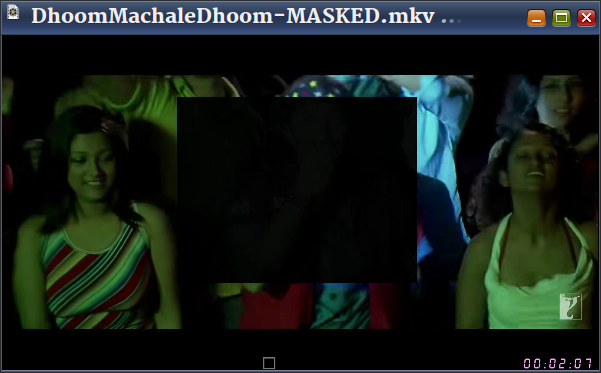
For each black box sequence, the script prompts for
- starting time (in seconds)
- ending time (in seconds)
- coordinates of the top-left corner of the box in x:y format
- width and height of the box in w:h format
To obtain the values, I had to pause the video, take a screenshot and paste from clipboard in GIMP. I would then use the Rectangle Select Tool to mark the region that needs to be masked and this gave me the x:Y and w:h values. I recorded these values in a text file (doomed.txt) …

… and then input it to the script.
bash mask-video.txt DhoomMachaleDhoom.mkv < doomed.txtVideo Masking FFmpeg Script
#!/bin/bash

set -u

sFile=$(readlink -f "$*")
sFileDir=$(dirname "$sFile")
sFileFullName=$(basename "$sFile")
sFileName="${sFileFullName%.*}"
sFileExt="${sFileFullName##*.}"

if [ -f "$sFile" ]; then
   echo "Masking $sFile"
else
  echo -f "ERROR: Not found $sFile"
  exit
fi

i=0
sFilter=""
echo "Press Enter twice to exit data-entry loop."
while true; do

    read -p "Enter starting time: " iStart
    read -p "Enter ending time: " iEnd

    if [ -z $iStart ] || [ -z $iEnd ]; then
        break
    fi

    if [ $iStart -ge 0 ] 2> /dev/null   &&
         [ $iEnd -ge 0 ] 2> /dev/null ; then
        if [ $iStart -ge $iEnd ]; then
            echo "ERROR: Starting time cannot be >= to ending time."
            echo "--------------------"
            continue
        else
          read -p "Enter mask location (x:y) values: " sMaskCoordinates
          read -p "Enter mask dimension (w:h) values: " sMaskDimensions

      if [ -z "$sMaskCoordinates" ] || [ -z "$sMaskDimensions" ]; then
        echo -e "ERROR: Invalid mask value(s)\n--------------------"
            continue
      else
        let i=i+1
        if [ -z "$sFilter" ]; then
          sFilter="[0:v:0]drawbox=${sMaskCoordinates}:${sMaskDimensions}:color=0x000000F0:thickness=fill:enable='between(t,${iStart},${iEnd})'"
        else
          sFilter="${sFilter},drawbox=${sMaskCoordinates}:${sMaskDimensions}:color=0x000000F0:thickness=fill:enable='between(t,${iStart},${iEnd})'"
        fi
      fi
        fi
    else
        echo -e "ERROR: Invalid number(s)\n--------------------"
        continue
    fi
done

cd "$sFileDir"
if [ -n "$sFilter" ]; then
  ffmpeg -i "$sFile" \
         -filter_complex "$sFilter" \
         -map 0:a \
         -c:V:0 libx265 -crf 28  \
         -c:a copy \
         -r 25 -pix_fmt yuv420p -y \
         "${sFileDir}/${sFileName}-MASKED.${sFileExt}" && \
     xdg-open "${sFileDir}/${sFileName}-MASKED.${sFileExt}"
fi
The masking black box is not entirely black. I have used a transparency value (F0 in 0x000000F0)
Video demo
Here is the low-res masked video sans audio in consideration of their copyright and my fair use.

Next stop: Remove John Abraham from the Dilbar song because he seems to be searching for a bathroom.
Alternatives
There are many ways to censor videos. I use one of three techniques:
- Masking: Block a part of the video frame, as described above
- Replace a colour with another: In an older blog post, I have mentioned how to censor skin tones to censor gratuitous airing of the cleavage.
- Blank the whole video frame and/or silence the audio: I will describe this in an another blog post.
Become an FFmpeg PRO by reading my book Quick Start Guide to FFmpeg.

- MORE INFO — http://www.vsubhash.in/ffmpeg-book.html
- BUY — https://books2read.com/ffmpeg (common link for all stores)