
When I started using Microsoft Visual Studio, it was for a VCD player program. I just put a user-friendly shell around Windows Media Player and made it work like a IrfanView-for-VCDs.

Recently, I have trawling Archive.org for Japanese TV programs and had no success. However, I found some VCD files. They were available as CD images in CUE/BIN format. There is no straightforward way to convert them to MP4 using FFmpeg. You have to first use vcdxrip to extract the DAT files in MPEG-1 format. Then, you can convert those MPEG-1 files to MP4 using H264 or H265 codecs.
Before you can use vcdxrip, install vcdimager.
pkexec apt install vcdimagerThen, assemble the CUE and BIN files of the VCD image in a directory and try something like this:
vcdxrip -c TopHitsSpecialsV1.cue -b TopHitsSpecialsV1.binThis extracted all the avseqNN.dat files in the VCD image as avseqNN.mpg files in the current directory. [The NN refers to the numbering of the files.]
You can then convert the MPEG-1 files to more compressed formats such as MPEG-4 and MPEG-H.
ffmpeg -i avseq06.mpg \
       -c:v libx264 -crf 22 -r 25 -c:a libfdk_aac -vbr 5 -ac 2 avseq06.mp4 \
       -c:v libx265 -crf 28 -r 25 -c:a libfdk_aac -vbr 5 -ac 2 avseq06.mkv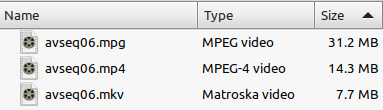
Why not convert the CUE/BIN image to ISO?
I tried that but it almost never works.
iat TopHitsSpecialsV1.bin > vcd.isoYou can mount the ISO but the DAT files will not play in any media player and ffplay will not touch them.
vcdxrip is also not very tolerant of errors. If it fails, then your recourse is probably VCDGear, which is shareware available only for Windows and Mac. An older version is available for Linux but I could not get it to work.
Become an FFmpeg PRO by reading my book Quick Start Guide to FFmpeg.

- MORE INFO — http://www.vsubhash.in/ffmpeg-book.html
- BUY — https://books2read.com/ffmpeg (common link for all stores)