
Earlier this month, Phoronix reported that FFmpeg 8 will have automatic speech recognition. Two days ago, the FFmpeg 8 was released and I decided to compile it from source.
Whisper.cpp
The speech-recognition feature is implemented using a filter named whisper. The documentation of the filter said:
It runs automatic speech recognition using the OpenAI’s Whisper model.

It requires the whisper.cpp library (<https://github.com/ggml-org/whisper.cpp>) as a prerequisite. After installing the library it can be enabled using: ./configure --enable-whisper.
This meant that I had to install whisper.cpp first. I did that with support for FFmpeg (existing installation). On its own, whisper.cpp supports transcription only from mp3 and WAV formats. If compiled with support for FFmpeg, it will support all the audio formats that FFmpeg supports. Also, another thing it could do was creating videos with Karaoke-style current word-highligted subtitles.
# Switch to root from desktop user
su MeRootUser

cd /opt

# Need root permission as I need to install to /opt
sudo bash

# Download source
git clone https://github.com/ggml-org/whisper.cpp.git

cd whisper.cpp

# Download a medium-sized LLM
sh ./models/download-ggml-model.sh base.en

# Build source and install
cmake -B build -D WHISPER_FFMPEG=yes
cmake --build build -j --config Release

# Download and install faster-loading LLM
make -j tiny.en

# Download and install LLM for easier voice activity detection (VAD)
./models/download-vad-model.sh silero-v5.1.2

exit # Exit sudo

exit # Exit MeRootUser and switch back to desktop user

# Make CLI tool available for desktop user
ln -s /opt/whisper.cpp/build/bin/whisper-cli ~/bin/whisper-cli
I could then transcribe audio speech with commands like:
whisper-cli -f China-is-DONE-in-the-South-China-Sea.mp3 \
            -m /opt/whisper.cpp/models/ggml-tiny.en.bin \
            --vad -vm /opt/whisper.cpp/models/ggml-silero-v5.1.2.bin \
            -osrt -of China-is-DONE-in-the-South-China-Sea
The of parameter specifies the filename for the output SRT subtitle.
The 'silero' LLM makes it easy to identify audio samples that contain voice. This itself takes some time to finish. After that, the 'ggml' LLM takes even more time to load. Then, the automatic transcription begins.
As transcription with the default LLM base.en.bin takes time, I had downloaded their tiny.en.bin. Even then, there is considerable starting delay on my 15-year-old laptop. Initially, I downloaded their 'large v3` LLM weighing over 1.5GB but it took forever to start. I deleted it. The tiny.en LLM does fine for most English audio files. For small audio files, transcription can commence without the VAD LLM.
whisper-cli -f China-is-DONE-in-the-South-China-Sea.mp3 \
            -m /opt/whisper.cpp/models/ggml-tiny.en.bin \
            -osrt -of China-is-DONE-in-the-South-China-Sea
Whisper.cpp is an offline C++ implementataion of the python-based Whisper speech recognition sotware of the OpenAI aritificial intelligence project. Whisper.cpp is entirely offline and does not need an Internet connection.
Whisper.cpp can directly create a Karaoke-style video with the subtitles:
whisper-cli -f China-is-DONE-in-the-South-China-Sea.mp3 \
            -m /opt/whisper.cpp/models/ggml-tiny.en.bin \
            -owts
# Creates China-is-DONE-in-the-South-China-Sea.mp3.wts

source China-is-DONE-in-the-South-China-Sea.wts
# Creates China-is-DONE-in-the-South-China-Sea.mp3.mp4
FFmpeg 8 cometh
FFmpeg 8 includes native decoders for several formats. It also has more Vulkan-based encoding and decoding support for various formats. (Vulkan is cross-platform framework for hardware or GPU-based codec processing.) I was particularly interested in the implementation of Whisper.cpp but could not get it to build. So, I built FFmpeg 8 without the whisper filter.
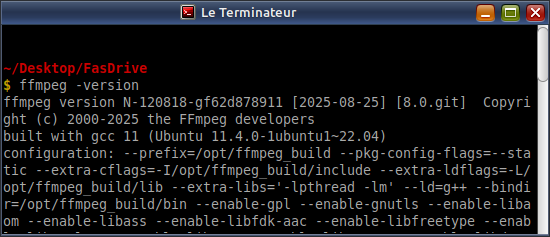
The source compilation and build process was similar to how I had decribed for Version 6 and Version 7. One new thing that I did this time was about the prefix directory. If you follow the official FFmpeg compilation guide, you will provide $HOME/ffmpeg_build directory as the place where the executables (ffmpeg, ffplay and ffprobe) need to be copied. This causes the FFmpeg executables to display your home directory in their banner. And, as anyone who has used these tools knows, they always display the banner before outputting process updates and results. Your username will be displayed in any screenshot or video you take with FFmpeg. (My customized terminal prompt does not display the username so it is annoying when FFmpeg reveals it.) So, this time, I customized the compilation PREFIX variable to /opt. This directory requires root permission for writing so I use this directory for all the programs that I compile. I also use this directory for Firefox as well — to prevent it from updating itself.
I will update this section when I manage to get the whisper filter.
CodeProject.com is a goner
Many many years ago, I found some very useful articles on CodeProject.com and subscribed to its newsletter. The newsletter kept me abreast with technology news as well as crowd-sourced programming-related articles. Eventually, I also joined and published a few articles. My experience with CodeProject was bittersweet. After I published my AndroidWithoutStupid article, a troll posted negative comments and deleted them afterwards. I assumed he was tasked by Google's perception management team (troll farm) and ignored it. Later, when I posted another article, he conspired with some other trolls got my account deleted! These pigs claimed my article was plagiarized and that original existed on a well-known content-scraper site (that had copied it from Open Source For You magazine website). I complained to CodeProject administrator and got the article and account back up but the experience made me apprehensive whenever I posted a new article.
Some months ago or maybe last year, I noticed that the CodeProject newsletter had not been reaching my mailbox and wondered what happened. Apparently, the owners wanted to exit and the new buyer was not interested in continuing the site. Currently, the articles are there but the main page is a goner. The new owner could have made money just by turning the site static and hosting ads but has let it drift into oblivion. Goodbye, CodeProject.
I wonder what happened to the trolls that lived under CodeProject. The reptilians are afraid of the Internets and these trolls will always find gainful employment elsewhere.
You know what they say? StackOverFlow (sold by founders to PE investors in 2021) is also circling the drain. Instead of using AI to automatically provide answers from its own databank, the site admins, moderators and other gatekeepers have turned the site into a hellscape that downvotes and closes most new questions as duplicates or off-topic. Now, AI-generated answers (trained on old SOF questions) provided by search engines have diverted traffic. Damn, how I wish it was Google, Microsoft and social media companies that were dying!
Good day, all!
Become an FFmpeg PRO by reading my book Quick Start Guide to FFmpeg.

- MORE INFO — http://www.vsubhash.in/ffmpeg-book.html
- BUY — https://books2read.com/ffmpeg (common link for all stores)