
I mass-download videos from online channels. The download script does add metadata to the filename as well but I still find myself lost. The video names may not be informative enough. I needed a video preview that included not just the beginning of the video but several stops towards the end as well.

I have provided two options in the script. One can load the matrix in memory and play it from there using ffplay — ffmpeg's own media player. The other will save the matrix to a temporary file and then plays it using the default media player. (The script does delete this temporary file after one minute.) If you do not have ffplay installed, then set bWriteToFile=0 and the video will play from a temporary file.
Le script is as follows:
#!/bin/bash
set -u

# Get file info
sFile="$*"
sFileDir=$(dirname "$sFile")
sFileFullName=$(basename "$sFile")
sFileName="${sFileFullName%.*}"
sExt="${sFileFullName##*.}"

# Changeables
bWriteToFile=1
#bWriteToFile=0
iLength=20
iDur=0
iWidth=0
iHeight=0
iRows=3
iCols=3
iDurLimit=$(( iRows*iCols*iLength*2 ))
#echo $iDurLimit

# Get video info
sProbeData=$(ffprobe -loglevel quiet -print_format "default=nw=1:nk=1" \
                -select_streams v:0 \
                -show_entries "stream=width,height,duration" \
                -i "${sFile}")

sDur=$(echo $sProbeData | cut -d " " -f3)
sWidth=$(echo $sProbeData | cut -d " " -f1)
sHeight=$(echo $sProbeData | cut -d " " -f2)

if [ "$sDur" = "N/A" ]; then
  sDur=$(ffprobe -loglevel quiet -print_format "default=nw=1:nk=1" \
                 -select_streams v:0 \
                 -show_entries "stream_tags=duration" \
                 -i "${sFile}")
  if [ -z "${sDur}" ]; then
    sDur1=$(ffprobe "${sFile}" 2>&1 | grep "Duration: ")
    if [ -z "${sDur1}" ]; then
            notify-send "Live Preview" "Duration stream information not found"
            echo "Live Preview: Duration stream information not found"
            exit
    else
          sDur2=${sDur1%%,*}
          sDur=${sDur2:11}
    fi
  fi

  sDur=${sDur%.*}
  iMin=$(echo $sDur | cut -d ":" -f2)
  iHour=$(echo $sDur | cut -d ":" -f1)
  iSec=$(echo $sDur | cut -d ":" -f3)
  iHour=${iHour#0}
  iMin=${iMin#0}
  iSec=${iSec#0}
  let iHour=iHour*60*60
  let iMin=iMin*60
  #echo $iHour $iMin $iSec
  let iDur=iHour+iMin+iSec
  #echo $iDur $iHour $iMin $iSec
else
  iDur=${sDur%.*}
fi

if [[ $sWidth =~ [^0-9] ]] || [[ $sHeight =~ [^0-9] ]]  || \
   [[ $sHeight =~ [^0-9] ]]; then
  notify-send "Live Gallery" "Invalid video info found"
    echo "Live Preview: Invalid video info found"
    exit
else
  let iWidth=sWidth
  let iHeight=sHeight
fi

#echo "Duration is $iDur"
#echo "Resolution is ${iWidth}x${iHeight}"

if [ $iDur -lt $iDurLimit ]; then
  notify-send "Live Gallery" "Not worth it"
    echo "Live Preview: Not worth it"
    exit
fi

# Build ffmpeg filter string
let iSplits=iRows*iCols
#echo $iSplits

if [ $bWriteToFile -eq 1 ]; then
  sFilter="movie=filename=${sFile},split=${iSplits}"
else
  sFilter="[0:v:0]split=${iSplits}"
fi

i=0
while [ $i -lt $iSplits ]; do
  sFilter="${sFilter}[v${i}]"
  let i=i+1
done

if [ $bWriteToFile -eq 1 ]; then
  sFilter="${sFilter};amovie=filename=${sFile},asplit=${iSplits}"
else
  sFilter="[0:a:0]asplit=${iSplits}"
fi

i=0
while [ $i -lt $iSplits ]; do
  sFilter="${sFilter}[a${i}]"
  let i=i+1
done

let iBreaks=$(( 1 + (iRows*iCols) ))
let iInterval=iDur/iBreaks
let iStart=iInterval
let iLast=iDur-iInterval
i=0
while [ $iStart -le $iLast ]; do
  sFilter="${sFilter};[v${i}]trim=start=${iStart}:duration=${iLength},setpts=PTS-STARTPTS,scale=${iWidth}/${iCols}:${iHeight}/${iRows}:force_original_aspect_ratio=decrease:force_divisible_by=2[sv${i}];[a${i}]atrim=start=${iStart}:duration=${iLength},asetpts=PTS-STARTPTS[sa${i}]"
  let iStart=iStart+iInterval
  let i=i+1
done
sFilter="${sFilter};"

let i=0
while [ $i -lt $iRows ]; do
  let j=0
  while [ $j -lt $iCols ]; do
    let k=(i*iCols)+j
    sFilter="${sFilter}[sv${k}]"
    let j=j+1
  done
  sFilter="${sFilter}hstack=inputs=${iCols}[r${i}];"
  let i=i+1
done

i=0
while [ $i -lt $iRows ]; do
  sFilter="${sFilter}[r${i}]"
  let i=i+1
done

sFilter="${sFilter}vstack=inputs=${iRows},pad=${iWidth}:${iHeight}:(ow-iw)/2:(oh-ih)/2:black[out0];"

i=0
while [ $i -lt $iSplits ]; do
  sFilter="${sFilter}[sa${i}]"
  let i=i+1
done
sFilter="${sFilter}amix=inputs=${iSplits}[out1]"

# Run it
if [ $bWriteToFile -eq 1 ]; then
  ffplay -autoexit \
         -window_title "Live preview of ${sFileName}.${sExt}" \
         -f lavfi -i "${sFilter}"
else
  sTempDir=$(dirname $(mktemp -u))
  ffmpeg -i "$sFile" \
         -filter_complex "${sFilter}" \
         -map "[out0]" -map "[out1]" \
         -c:v libx265 -preset ultrafast -c:a flac -ac 2 -y \
         "${sTempDir}/${sFileName}-PREVIEW.mkv" && \
      xdg-open "${sTempDir}/${sFileName}-PREVIEW.mkv" && \
      sleep 60 && \
      rm "${sTempDir}/${sFileName}-PREVIEW.mkv"
  #Replace 'libx265 -preset ultrafast' with 'ffv1' if your
  #media player can play it
fi
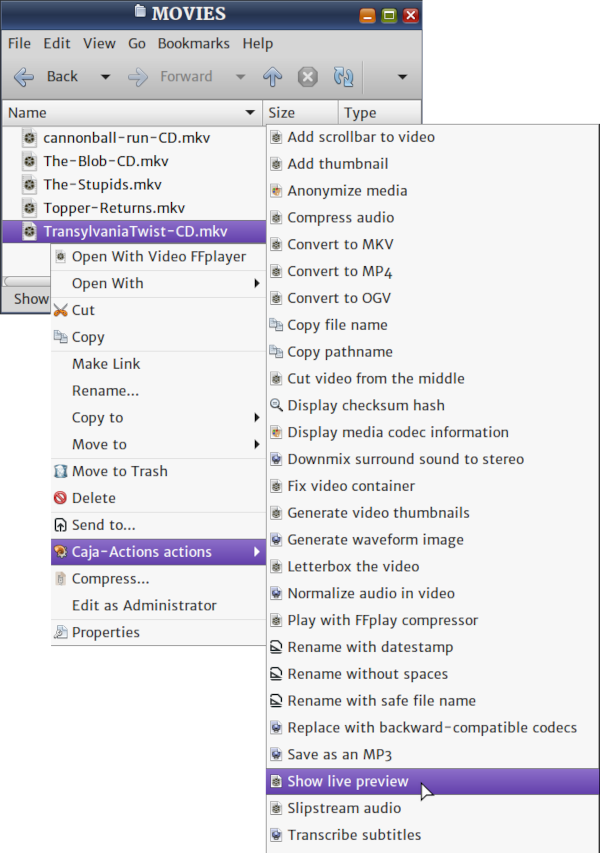
I use this script in a Caja Action Configuration.
The script is scalable. On any computer, particularly if you want to listen to the downmixed audio as well, a 2x2 matrix should be optimal. On my computer, anything more than 3x3 causes it to run out of memory. If it was a static thumbnail matrix, the script would have executed a few seconds. But, this script generates video thumbnails and it takes more than just a few seconds. Still, it is a time saver.
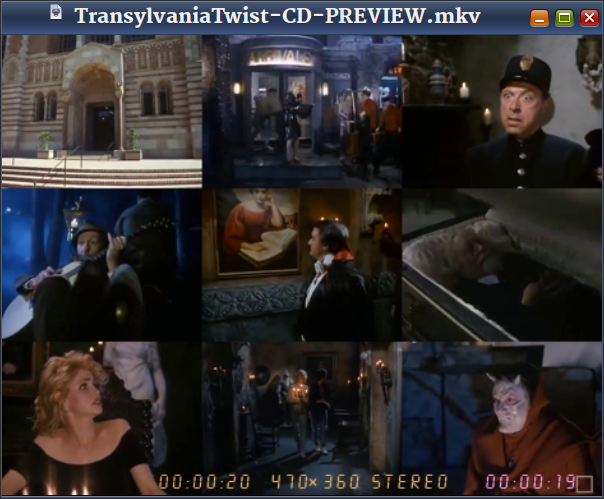
Video Demo

Become an FFmpeg PRO by reading my book Quick Start Guide to FFmpeg.

- MORE INFO — http://www.vsubhash.in/ffmpeg-book.html
- BUY — https://books2read.com/ffmpeg (common link for all stores)